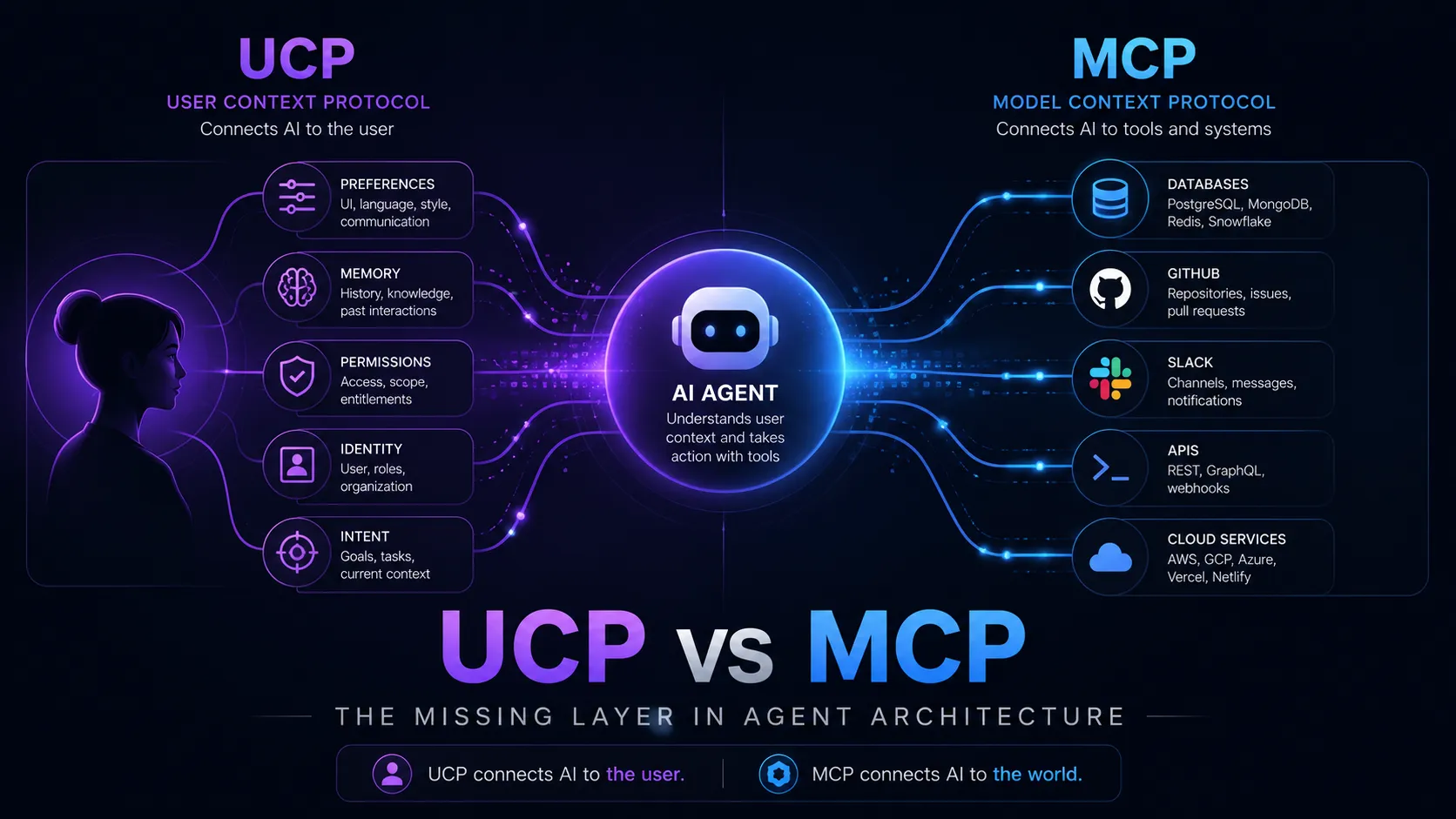
UCP vs MCP: Two Agent Protocols, Two Jobs (With Real API Examples)
Google's Universal Commerce Protocol and Anthropic's Model Context Protocol get lumped together because both have 'agent' in the pitch. They solve different problems at different layers. Here's what each one actually looks like on the wire — with concrete ecommerce examples for MCP.
I keep getting asked whether the Universal Commerce Protocol (UCP) “replaces” the Model Context Protocol (MCP). It’s a fair question — both launched into the same agentic-AI hype cycle, both have “protocol” in the name, and both show up in the same Google keynote slides. But they don’t compete. They sit at different layers, and the cleanest way to see that is to look at what each one actually puts on the wire.
So this post is mostly API examples. I’ll give a short framing for each protocol, then show real request/response shapes. For MCP I’ll make every example an ecommerce one, so you can hold the two side by side and see exactly where the seam is.
The one-line version: MCP is how an agent calls a tool. UCP is what an agent and a merchant say to each other to complete a purchase. UCP can even be carried over MCP — they compose, they don’t collide.
The layer cake
  UCP   — commerce semantics: checkout, catalog, orders, fulfillment   (what to say)
  ─────────────────────────────────────────────────────────────────
  MCP / A2A / REST   — transport & tool access                         (how to say it)
  ─────────────────────────────────────────────────────────────────
AP2 — payment authorization: signed mandates (proof money is allowed)- MCP (Anthropic, Nov 2024): a general-purpose, JSON-RPC 2.0 protocol that lets any AI host discover and call tools, read resources, and run prompts on an external server. Vertical-agnostic — it doesn’t know “commerce” from “weather.”
- UCP (Google + Shopify et al., Jan 2026): a commerce vocabulary — a set of capabilities (checkout, catalog, orders) a merchant advertises and an agent drives, transport-agnostic, with payment trust delegated to AP2.
Now the wire.
MCP on the wire (ecommerce examples)
MCP is JSON-RPC 2.0 over either stdio (local) or Streamable HTTP (remote). A session opens with an initialize handshake where both sides negotiate a protocol version and declare capabilities.
1. The handshake
// → client to server
{
  "jsonrpc": "2.0",
  "id": 1,
  "method": "initialize",
  "params": {
    "protocolVersion": "2025-06-18",
    "capabilities": { "sampling": {}, "elicitation": {} },
    "clientInfo": { "name": "shopping-agent", "version": "1.4.0" }
  }
}
// ← server to client
{
"jsonrpc": "2.0",
"id": 1,
"result": {
"protocolVersion": "2025-06-18",
"capabilities": { "tools": { "listChanged": true }, "resources": {} },
"serverInfo": { "name": "acme-store-mcp", "version": "0.3.0" }
}
}2. Discovering the store’s tools
The agent asks what it can do. This is where an ecommerce MCP server earns its keep — each tool is a typed action against the store.
// → tools/list
{ "jsonrpc": "2.0", "id": 2, "method": "tools/list" }
// ← the store exposes its catalogue of actions
{
"jsonrpc": "2.0",
"id": 2,
"result": {
"tools": [
{
"name": "search_products",
"title": "Search products",
"description": "Full-text product search with optional filters.",
"inputSchema": {
"type": "object",
"properties": {
"query": { "type": "string" },
"max_price": { "type": "number" },
"in_stock_only": { "type": "boolean", "default": true }
},
"required": ["query"]
}
},
{
"name": "add_to_cart",
"title": "Add an item to the cart",
"inputSchema": {
"type": "object",
"properties": {
"cart_id": { "type": "string" },
"variant_id": { "type": "string" },
"quantity": { "type": "integer", "minimum": 1, "default": 1 }
},
"required": ["variant_id"]
}
},
{
"name": "create_checkout",
"title": "Create a checkout session",
"inputSchema": {
"type": "object",
"properties": { "cart_id": { "type": "string" } },
"required": ["cart_id"]
}
}
]
}
}3. Calling a tool — tools/call
The agent decides to search. Note the response carries both human-readable content and machine-readable structuredContent (the latter standardized in the 2025-06-18 spec, so the model gets clean JSON instead of having to parse prose).
// → tools/call
{
  "jsonrpc": "2.0",
  "id": 3,
  "method": "tools/call",
  "params": {
    "name": "search_products",
    "arguments": { "query": "single origin espresso beans", "max_price": 30 }
  }
}
// ← result
{
"jsonrpc": "2.0",
"id": 3,
"result": {
"content": [
{ "type": "text", "text": "Found 2 matches under $30." }
],
"structuredContent": {
"products": [
{
"id": "prod_88213",
"title": "Ethiopia Yirgacheffe — 250g",
"price": { "amount": 1899, "currency": "USD" },
"variant_id": "var_88213_whole",
"in_stock": true
},
{
"id": "prod_88219",
"title": "Colombia Huila — 250g",
"price": { "amount": 1650, "currency": "USD" },
"variant_id": "var_88219_whole",
"in_stock": true
}
]
},
"isError": false
}
}4. Defining that tool server-side (TypeScript SDK)
This is what the merchant writes. The @modelcontextprotocol/sdk registers each tool with an input and output schema and a handler:
import { McpServer } from '@modelcontextprotocol/sdk/server/mcp.js';
import { z } from 'zod';

const server = new McpServer({ name: 'acme-store-mcp', version: '0.3.0' });

server.registerTool(
  'search_products',
  {
    title: 'Search products',
    description: 'Full-text product search with optional filters.',
    inputSchema: {
      query: z.string(),
      max_price: z.number().optional(),
      in_stock_only: z.boolean().default(true),
    },
    outputSchema: {
      products: z.array(
        z.object({
          id: z.string(),
          title: z.string(),
          price: z.object({ amount: z.number(), currency: z.string() }),
          variant_id: z.string(),
          in_stock: z.boolean(),
        }),
      ),
    },
  },
  async ({ query, max_price, in_stock_only }) => {
    const products = await catalog.search({ query, max_price, in_stock_only });
    return {
      content: [{ type: 'text', text: `Found ${products.length} matches.` }],
      structuredContent: { products },
    };
  },
);
5. Resources — read-only context
Tools act; resources are addressable, read-only context the host can pull in. An order makes a natural resource:
// → resources/read
{
  "jsonrpc": "2.0",
  "id": 4,
  "method": "resources/read",
  "params": { "uri": "order://1007" }
}
// ← the order document, no side effects
{
"jsonrpc": "2.0",
"id": 4,
"result": {
"contents": [
{
"uri": "order://1007",
"mimeType": "application/json",
"text": "{\"id\":\"1007\",\"status\":\"shipped\",\"tracking\":\"1Z999...\",\"total\":{\"amount\":3549,\"currency\":\"USD\"}}"
}
]
}
}6. Elicitation — pausing to ask the user
Mid-checkout the server realises it needs a shipping address it doesn’t have. Instead of failing, it uses elicitation (a client capability) to request structured input — the host renders a form and the user fills it in:
// ← server asks the host for more input
{
  "jsonrpc": "2.0",
  "id": 5,
  "method": "elicitation/create",
  "params": {
    "message": "I need a shipping address to finish checkout.",
    "requestedSchema": {
      "type": "object",
      "properties": {
        "line1": { "type": "string" },
        "city": { "type": "string" },
        "postal_code": { "type": "string" },
        "country": { "type": "string" }
      },
      "required": ["line1", "city", "postal_code", "country"]
    }
  }
}
That’s the whole MCP story for ecommerce: typed tools for actions, resources for context, prompts for canned workflows, and elicitation/sampling so the server can reach back to the user or the model. Notice what’s missing: MCP has no opinion about what a “cart” or a “checkout total” should look like. Every store invents its own tool names and schemas. That’s exactly the gap UCP fills.
UCP on the wire
UCP’s defining move is decentralized discovery. There’s no registry and no gatekeeper — a merchant publishes a capability profile at a well-known URL on its own domain, and any agent can read it.
1. Discovery — /.well-known/ucp
GET https://store.acme.com/.well-known/ucp{
"ucp_version": "1.0",
"merchant": {
"name": "Acme Coffee Co.",
"merchant_of_record": "Acme Coffee Co."
},
"transports": ["https+json", "mcp", "a2a"],
"capabilities": {
"dev.ucp.shopping.catalog": { "version": "1.2", "endpoint": "/ucp/catalog" },
"dev.ucp.shopping.checkout": { "version": "1.4", "endpoint": "/ucp/checkout" },
"dev.ucp.shopping.orders": { "version": "1.1", "endpoint": "/ucp/orders" }
},
"extensions": [
"dev.ucp.shopping.fulfillment",
"dev.ucp.shopping.discount",
"dev.ucp.shopping.ap2_mandate"
]
}Three things to read off this manifest: the merchant stays Merchant of Record; it advertises which transports it speaks (note mcp is one of them); and capabilities and extensions are independently versioned so the ecosystem can evolve piecemeal.
2. The base shopping service — a checkout session
UCP’s core primitive is the checkout session: line items, totals, and status messages. Here the agent opens one over the primary HTTPS+JSON binding:
POST https://store.acme.com/ucp/checkout
Content-Type: application/json
{
"capability": "dev.ucp.shopping.checkout",
"version": "1.4",
"line_items": [
{ "product_id": "prod_88213", "variant_id": "var_88213_whole", "quantity": 2 }
],
"extensions": {
"dev.ucp.shopping.discount": { "code": "WELCOME10" },
"dev.ucp.shopping.fulfillment": {
"method": "shipping",
"address": { "line1": "1 Pier St", "city": "Fremantle",
"postal_code": "6160", "country": "AU" }
}
}
}{
"checkout_session_id": "cs_2f9a",
"status": "ready_for_payment",
"line_items": [
{ "product_id": "prod_88213", "quantity": 2,
"unit_price": { "amount": 1899, "currency": "USD" } }
],
"totals": {
"subtotal": { "amount": 3798, "currency": "USD" },
"discount": { "amount": -380, "currency": "USD" },
"shipping": { "amount": 900, "currency": "USD" },
"tax": { "amount": 0, "currency": "USD" },
"total": { "amount": 4318, "currency": "USD" }
},
"messages": [
{ "type": "info", "text": "WELCOME10 applied: 10% off." }
]
}The shape is the point. Every UCP merchant returns line_items, totals, and messages with the same semantics, so a single agent implementation works across Shopify, Etsy, Wayfair, Target, and any independent store — no per-merchant glue. The discount and fulfillment keys are extensions augmenting the base checkout capability.
3. Payment — handing off to AP2
UCP deliberately doesn’t move money. When the session is ready_for_payment, the agent attaches an AP2 mandate — a cryptographically signed proof that the user authorized this autonomous purchase — via the ap2_mandate extension:
{
  "checkout_session_id": "cs_2f9a",
  "extensions": {
    "dev.ucp.shopping.ap2_mandate": {
      "mandate": "eyJhbGciOiJFUzI1NiIsInR5cCI6Ikp..."  // signed JWT-style intent
    }
  }
}
The merchant verifies the mandate, captures payment through its own processor (it’s still Merchant of Record), and the order flows into the orders capability for status tracking. AP2 is the trust seam; UCP is the conversation around it.
Where they meet: UCP over MCP
Look back at that /.well-known/ucp manifest — "transports": ["https+json", "mcp", "a2a"]. A merchant can expose its UCP capabilities as MCP tools. The agent then discovers commerce actions through the same tools/list it uses for everything else, but the tool shapes are standardized by UCP:
// tools/list, but the schemas are UCP-defined commerce primitives
{
  "tools": [
    {
      "name": "ucp.checkout.create",
      "description": "Open a UCP checkout session (dev.ucp.shopping.checkout v1.4).",
      "inputSchema": {
        "type": "object",
        "properties": {
          "line_items": { "type": "array" },
          "extensions": { "type": "object" }
        },
        "required": ["line_items"]
      }
    },
    { "name": "ucp.orders.get", "description": "Fetch order status (dev.ucp.shopping.orders v1.1)." }
  ]
}
This is the punchline. MCP carries the call; UCP defines the shape of the call. Without UCP, every store’s MCP tools are bespoke and an agent must learn each one. With UCP, ucp.checkout.create means the same thing everywhere, whether it arrives over MCP, A2A, or plain REST.
Cheat sheet
| MCP | UCP | |
|---|---|---|
| Job | Connect an agent to any tool/data | Let an agent shop and buy anywhere |
| Layer | Transport / tool access | Commerce semantics |
| Wire format | JSON-RPC 2.0 (stdio, Streamable HTTP) |
JSON; REST primary, also MCP / A2A |
| Discovery | initialize + tools/list per session |
/.well-known/ucp manifest on the domain |
| Core nouns | tools, resources, prompts | checkout session, line items, totals, capabilities, extensions |
| Payments | Out of scope | Delegates to AP2 (signed mandates) |
| Real rival | None — it’s foundational | OpenAI/Stripe’s ACP |
If you’re building agent integrations generally, learn MCP first — it’s the substrate. If you’re a merchant who wants to be discoverable and transactable inside AI surfaces, you care about UCP (and you’ll likely expose it over MCP). They’re a layer cake, not a cage match.