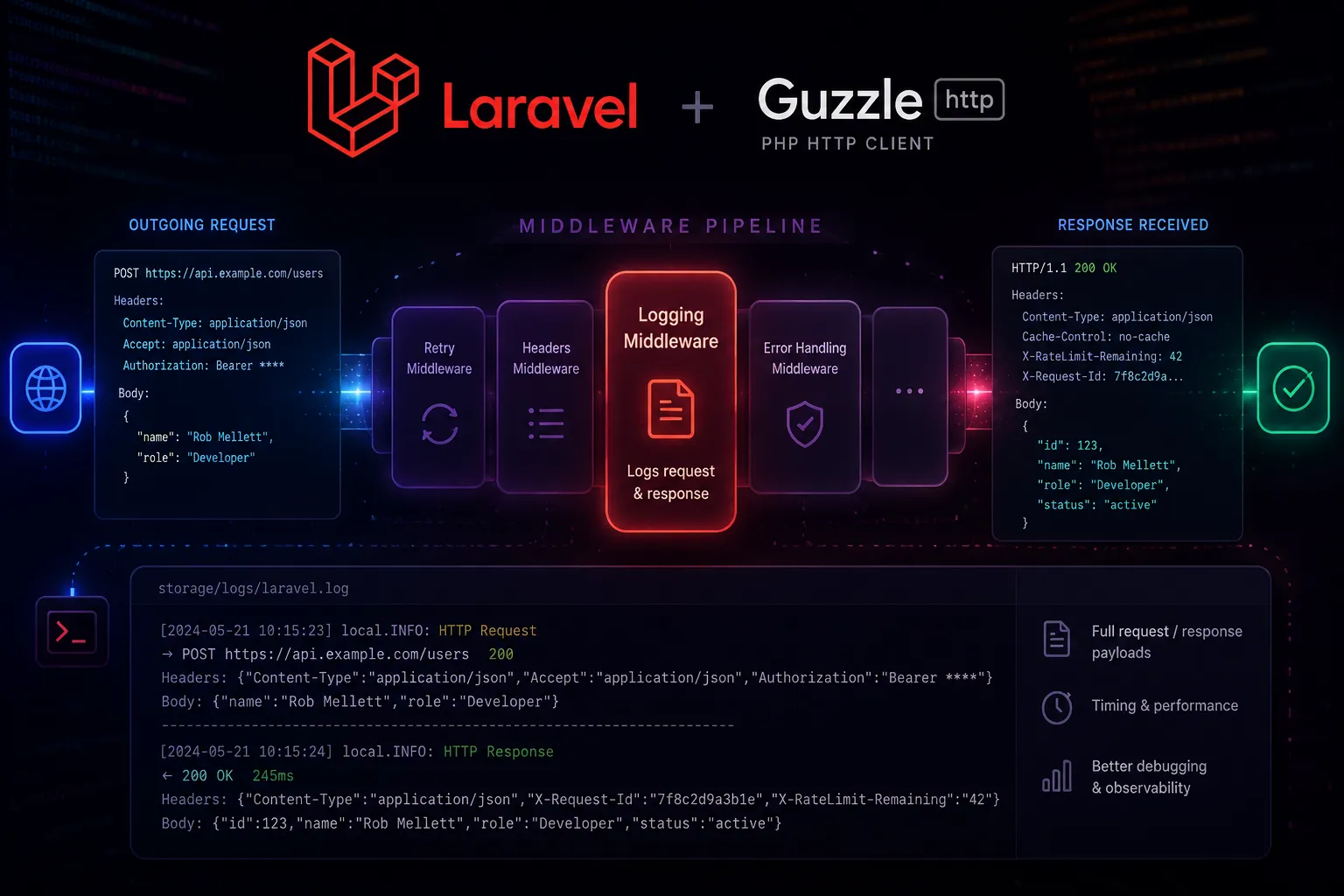
Guzzle Middleware in Laravel
How to use Guzzle middleware to log, inspect, and transform every outbound HTTP request your Laravel app makes — with a drop-in logging package as the worked example.
Laravel’s Http facade wraps Guzzle under the hood, and Guzzle ships with a full middleware stack. That means every outbound request your app makes can pass through a chain of handlers before it leaves — and a chain of handlers when the response comes back. You can use that to add logging, inject headers, retry on failure, or intercept responses for testing.
This post walks through how the middleware system works, then shows how to drop in the robmellett/http-logging package to get structured, redaction-safe HTTP logs with minimal effort.
How Guzzle Middleware Works
Guzzle uses a handler stack. At the bottom of the stack is the real HTTP transport (a CurlHandler or MockHandler in tests). Middleware wraps that transport like onion layers — each one receives the request and a $next callable, does its work, and calls $next to pass the request down to the layer below.
The signature is a double-callable:
function (callable $handler): Closure {
    return function (RequestInterface $request, array $options) use ($handler) {
        // inspect / mutate $request before it goes out
        return $handler($request, $options)->then(
            function (ResponseInterface $response) {
                // inspect / mutate $response as it comes back
                return $response;
            }
        );
    };
}
The inner closure is what Guzzle actually calls. The outer callable receives the next $handler in the stack — either the transport, or the next middleware — so you get full control over both directions.
Laravel’s Http facade exposes this via withMiddleware():
use GuzzleHttp\Middleware;
use Psr\Http\Message\RequestInterface;

Http::withMiddleware(
    Middleware::mapRequest(function (RequestInterface $request) {
        return $request->withHeader('X-App-Version', config('app.version'));
    })
)->get('https://api.example.com/endpoint');
Installing the HTTP Logging Package
Rather than writing a logging middleware from scratch, the robmellett/http-logging package gives you one that’s already wired to Laravel’s log channels and ships with a formatter that redacts sensitive values before they hit disk.
composer require robmellett/http-loggingPublish the config:
php artisan vendor:publish --tag="http-logging-config"This drops config/http-logging.php into your app.
Configuring the Log Channel
The package writes to a dedicated http_logs channel. Add it to config/logging.php:
'channels' => [

    // ... your existing channels

    'http_logs' => [
        'driver'    => 'single',
        'path'      => storage_path('logs/http.log'),
        'level'     => 'debug',
        'formatter' => \RobMellett\HttpLogging\Support\SecureJsonFormatter::class,
    ],
],
Using a separate file (http.log) keeps your main laravel.log readable. If you prefer everything in one place, point path at storage_path('logs/laravel.log').
The SecureJsonFormatter writes structured JSON and automatically redacts sensitive headers and body values before writing — more on that below.
Adding Middleware to a Single Request
The quickest way to use it is inline:
use RobMellett\HttpLogging\HttpLogging;
use Illuminate\Support\Facades\Http;

$response = Http::withMiddleware(new HttpLogging())
    ->asJson()
    ->get('https://jsonplaceholder.typicode.com/posts');
Every request-response pair gets a shared UUID so you can correlate the two log entries even when requests overlap:
{
    "message": "Request a1b2c3d4-...",
    "context": {
        "request_id": "a1b2c3d4-...",
        "method": "GET",
        "uri": {
            "scheme": "https",
            "host": "jsonplaceholder.typicode.com",
            "path": "/posts",
            "query": ""
        },
        "headers": { "User-Agent": ["GuzzleHttp/7"] },
        "body": null
    }
}
{
"message": "Response a1b2c3d4-...",
"context": {
"response_id": "a1b2c3d4-...",
"status_code": 200,
"headers": { "Content-Type": ["application/json; charset=utf-8"] },
"body": [{ "userId": 1, "id": 1, "title": "..." }]
}
}Registering Middleware Globally
Adding withMiddleware() to every call gets old fast. A better approach is to register the middleware globally in a service provider so it applies to every Http request in the app.
In App\Providers\AppServiceProvider:
use Illuminate\Support\Facades\Http;
use RobMellett\HttpLogging\HttpLogging;

public function boot(): void
{
    Http::globalMiddleware(new HttpLogging());
}
From this point on, every Http::get(), Http::post(), or Http::send() call anywhere in the app is logged — no per-call setup required.
Using it Inside a Service Class
When you use Laravel’s HTTP client inside a dedicated service, attaching middleware per-client gives you control over which external calls get logged:
<?php

declare(strict_types=1);

namespace App\Services;

use Illuminate\Http\Client\PendingRequest;
use Illuminate\Support\Facades\Http;
use RobMellett\HttpLogging\HttpLogging;

class GitHubClient
{
    private PendingRequest $client;

    public function __construct()
    {
        $this->client = Http::withMiddleware(new HttpLogging())
            ->withToken(config('services.github.token'))
            ->baseUrl('https://api.github.com')
            ->acceptJson();
    }

    public function getUser(string $username): array
    {
        return $this->client
            ->get("/users/{$username}")
            ->throw()
            ->json();
    }

    public function listRepositories(string $username): array
    {
        return $this->client
            ->get("/users/{$username}/repos", ['per_page' => 100])
            ->throw()
            ->json();
    }
}
Both getUser and listRepositories will be logged because the middleware is attached to the base client.
Redacting Sensitive Data
The SecureJsonFormatter is the real payoff. It scans request and response payloads before writing them to disk and replaces sensitive values with [--REDACTED--]. The config at config/http-logging.php controls what gets redacted:
return [
    'channel' => 'http_logs',

    'secure_json_formatter' => [
        'redacted_value' => '[--REDACTED--]',

        // Exact values to redact (pulled from your env at runtime)
        'secrets' => [
            // env('STRIPE_SECRET'),
            // env('GITHUB_TOKEN'),
        ],

        // Regex patterns — bearer tokens are stripped by default
        'regexes' => [
            '/Bearer\s\w+/',
        ],
    ],
];
Add any secret values your app uses to secrets. The formatter walks the entire serialized payload and replaces any match, so it doesn’t matter if the token appears in a header, a query string, or a nested JSON body.
For example, if you add env('STRIPE_SECRET') to secrets, a log entry that would have contained:
"headers": { "Authorization": ["Bearer sk_live_abc123"] }…becomes:
"headers": { "Authorization": ["[--REDACTED--]"] }If you need the raw unredacted logs (for local debugging only), swap the formatter:
'http_logs' => [
    'driver'    => 'single',
    'path'      => storage_path('logs/http.log'),
    'level'     => 'debug',
    'formatter' => \Monolog\Formatter\JsonFormatter::class,
],
Never ship that to production.
Writing Your Own Middleware
Once you understand the pattern, writing custom middleware is straightforward. Here’s one that injects a correlation ID from the current request into every outbound call — useful when you’re tracing a single user request across multiple services:
<?php

declare(strict_types=1);

namespace App\Http\Middleware;

use Closure;
use Illuminate\Support\Facades\Request;
use Psr\Http\Message\RequestInterface;
use Psr\Http\Message\ResponseInterface;

class PropagateCorrelationId
{
    public function __invoke(callable $handler): Closure
    {
        return function (RequestInterface $request, array $options) use ($handler) {
            $correlationId = Request::header('X-Correlation-Id', (string) str()->uuid());

            $request = $request->withHeader('X-Correlation-Id', $correlationId);

            return $handler($request, $options)->then(
                fn (ResponseInterface $response) => $response
            );
        };
    }
}
Register it globally alongside the logging middleware:
Http::globalMiddleware(new HttpLogging());
Http::globalMiddleware(new PropagateCorrelationId());
Middleware is applied in the order it’s added, so requests pass through PropagateCorrelationId (which adds the header) and then through HttpLogging (which captures the header in the log).
A Note on Testing
When you have logging middleware registered globally, it fires during tests too. That’s generally fine — the http_logs channel writes to a file and doesn’t affect test assertions. But if you’re using Http::fake() in your tests, the middleware still runs against the faked responses, so the logs will reflect the faked data rather than real network traffic. That’s the expected and correct behaviour.
If you need to assert that specific log entries were written, Laravel’s Log::shouldReceive() (via Mockery) or the WithFaker trait paired with a custom log channel work well.
The middleware pattern is one of the cleanest extension points in the HTTP stack. Once it’s wired up, every external call your app makes is observable with no changes to your application code — and the robmellett/http-logging package gets you there in under five minutes.